
How to improve how desktops/laptops/smartphones execute code

[This post is released through Creative Commons Generic Attribution 2 (which allows all uses).] [This post is a work-in-progress. Version of this post is SusuPosts@ee3dcf3, view `preview` branch for the most new version.]
Discussion
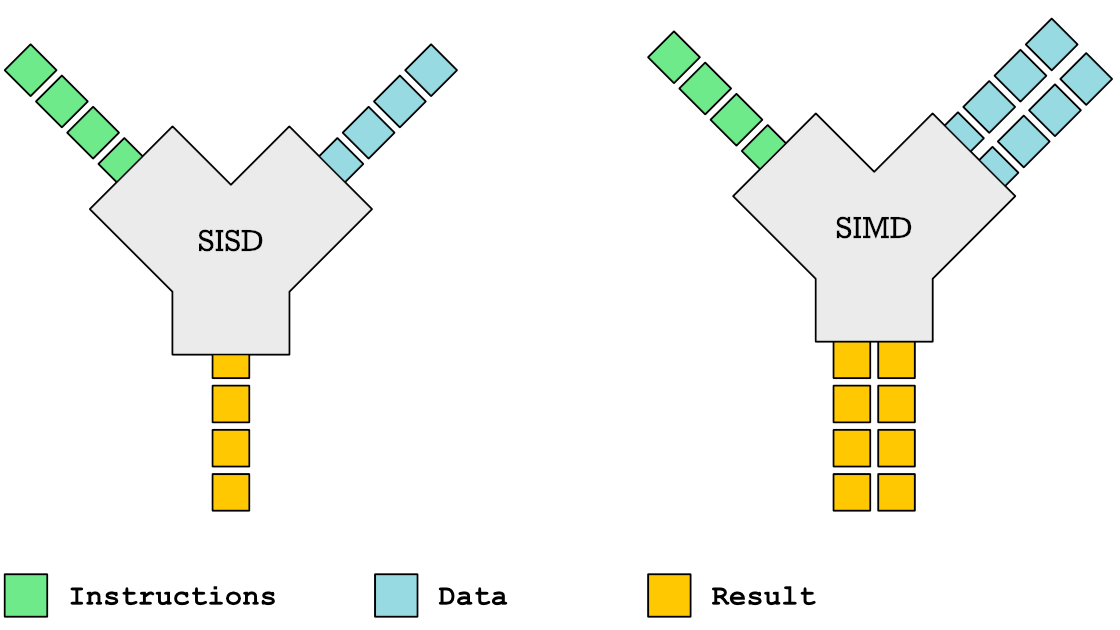
Since around the year 2002, the physical CMOS limits of transistors have meant that the ghz (gigahertz) of CPU‘s can not improve, and thus multicore (also known as SMP (Symmetric Multiprocessing)) / SIMD (Single Instruction Multiple Data) is required for throughput to continue to improve.
To improve:
Switch to CPU‘s with more cores and new SIMD opcodes to use.
Switch to CPU‘s / GPU‘s / RAM which uses more small transistors (lower “nm“ values), as those have more compute units, plus those improve power use.
For closed source program use:
Search for new versions of programs, which use OpenMP (or which use other such tools which produce SMP & SIMD code flows).
Search for versions which list the newest CPU which is not more new than the CPU in use.
Microsoft Windows has WOW64 to execute programs as x32 or x64 based on your current CPU.
Linux‘s equivalent is MultiArch (which is similar to Microsoft Windows’ WOW64.
If the CPU in use supports 64-bit execution, choose program versions which list “AMD64“, “Intel64“, “x86_64“, “aarch64“, or “Arm64“; 64-bit executables all use SIMD opcodes.
For open source (FLOSS) programs use:
Recompile the source code with
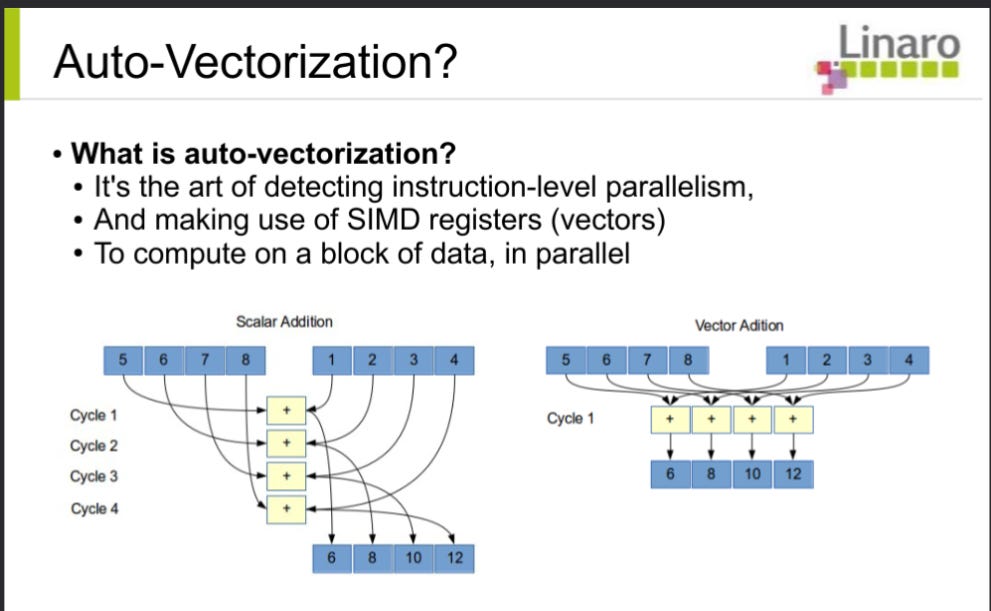
--march=native(insert into compiler flags) to produce the newest SIMD code which the currrent CPU can use.MSVC (MicroSoft Visual Compiler) has auto-vectorization (produces executables which use SIMD opcodes on compatible CPUs).
GCC (GNU Compiler Collection) also has auto-vectorization.
Clang / LLVM (Low-Level Virtual Machine) also has auto-vectorization.
Recompile the source code with
--openmp(insert into compiler flags), which enables#pragma omp <command>(where<command>is the specific subset of OpenMP to use, such asparallelorsimd).Improve source code: if the source code does not have SIMD directives, ensure the code is amenable (does not have inter-element dependencies of tensors) (remember to consider how the compiler's Abstract syntax tree differs from human-readable source code) + insert
#pragma omp simdabove amenable loops, or use intrinsic functions (which allow manual insertion of SIMD opcodes).Improve Source code: if the source code does not have directives for multiple CPU core use, insert
#pragma ompdirectives which instruct the compiler to prefer multiple core use above the start of loops which most suit multiple core use:Loops which do not have dependencies on the previous iteration of the loop.
Loops total whose total iterations count can absorb (ammeliorate) thread (or process) startup costs. Unless the architecture is similar to GPUs (which have minimal thread startup costs), this requires iteration counts in the thousands (or more numerous).
Disable stylistic features (such as shadows or animations) — unless your workflow has use for those (such as school classes about graphics do) — and measure (to determine if the resource use goes down or if responsiveness improves; if so, put a note to disable those in the future).
C++'s "syntactic sugar" reduces source code sizes (due to classes, templates, and the STL, which allow more source code reuse), plus are more abstract, which gives compilers more room to implement the source code through SMP or SIMD opcodes (uops):
https://stackoverflow.com/questions/13676172/optimization-expectations-in-the-stl
https://devblogs.microsoft.com/cppblog/algorithm-optimizations-advanced-stl-part-2/
SIMD (Single Instruction Multiple Data)
SIMD-compatible CPUs:
All 64-bit Intel / AMD CPUs allow SSE2 (Streaming SIMD Extensions 2).
Most aarch64 / Arm64 CPUs allow NEON.
SIMD resources:
Common SIMD instruction sets include SSE2 (Streaming SIMD Extensions 2), SSE4.2 and AVX2 (Advanced Vector Extensions 2[2].
Newer Intel64 / AMD64 CPUs allow AVX-512 (which is one of the newest SIMD instruction sets) opcodes to do operations on tensors (vectors, arrays or matrices) of 16 packed 32-bit
integers (orfloats) at once (which uses just 1 microinstruction-cycle -- 1 uop -- on the CPU). AVX-512 allows expansion to AVX-1024 (opcodes which compute packs of 32).Newest CPUs allow AMX (Advanced Matrix Extensions ) opcodes, which compute 1024 half-float operations per uop.
AMX use is similar to TPU use, but is through (new) opcodes on normal CPUs (opposed to dedicated ASICs, which constitute TPUs).
Comparison of how AVX2 versus AVX-512 versus AMX intrinsic functions implement 4x4 tensor transpose. Digital Assistant's are not suitable to produce most code (such as code which involves high-level control flow or user interactions), but are suitable to produce specific compute kernels (such as tensor transpose).
Intel Performance Primitives (for Microsoft Windows and Linux / Unix) includes multiple SIMD versions of compute kernels, and uses uses
cpuidto do dynamic code dispatch to the most new instruction set compatible with the current CPU (similar to GCC's "function multi-versioning", but specific to x86 CPUs).Solaris also uses
cpuidto choose the most performant code path (opcodes) which your CPU allows and has protocols which allow users to force use of advanced opcoodes.
GCC / LLVM / Clang accept march=native to recompile programs to use the most advanced opcodes.
Linux / Unix allows you to recompile the whole OS, to use the newest instruction set opcodes (uops) compatible with the current CPU.
ArchLinux was produced to reduce the effort to recompile all packages, with custom flags (the Linux ecosystem calls programs "packages") to use your CPU’s most suitable opcodes (uops).
New versions of GCC / LLVM / Clang have flags to produce multiple code SIMD versions of compute kernels and use
cpuidto choose the path which uses the newest opcodes (uops) compatible with the current CPU, similar to Intel Performance Primitives (except not specific to x86 CPUs). GCC's version of this is "function multi-versioning"
GPGPUs (General Purpose Graphics Processor Units)
Auto-parallelization produces threaded (multicore) code (searches for code with lots of loops, distributes those loads across all local CPUs or GPUs):
https://www.intel.com/content/www/us/en/developer/articles/technical/automatic-parallelization-with-intel-compilers.html; “Adding the
-Qparallel(Windows*) or-parallel(Linux* or macOS*) option to the compile command is the only action required of the programmer. However, successful parallelization is subject to certain conditions”https://gcc.gnu.org/wiki/AutoParInGCC (
gccorg++) "You can trigger it by 2 flags-floop-parallelize-all -ftree-parallelize-loops=4"https://polly.llvm.org/docs/UsingPollyWithClang.html “To automatically detect parallel loops and generate OpenMP code for them you also need to add
-mllvm -polly-parallel -lgompto yourCFLAGS.clang -O3 -mllvm -polly -mllvm -polly-parallel -lgomp file.c"https://link.springer.com/chapter/10.1007/978-3-030-64616-5_38 "LLVM Based Parallelization of C Programs for GPU"
https://stackoverflow.com/questions/41553533/auto-parallelization-of-simple-do-loop-memory-reference-too-complex (distributes Fortran tasks).
TPUs (Tensor Processor Units)
The subset of ASICs (Application-Specific Integrated Circuits) known as TPUs are processors which are specific to the tensor workloads which the SIMD section mentions, such as AMX's tensor transpose uop.
Most TPUs were limited to specific commercial users, but new consumer computers (and some smartphones) include TPUs.
Most smartphone TPUs sacrifice integer (and float) precision, to reduce die area (square inches) and power use (watts), which limits those to inference use. It is possible that future chips will use some new fused architecture which allows training (back-propagation) + inference (forward-propagation) from shared transistors..
Google's Edge TPUs can does inference through TensorFlow. Coral says the original Edge TPU processes 4 quarter-precision teraOPS (trillion opcodes per second) with 2W power use
The Google Pixel 2's Pixel Visual Core... is an edgeTPU (mobile chip which does inference through TensorFlow)).
The Google Pixel 4's Pixel Neural Core... is also an edgeTPU (can also do inference through TensorFlow). Pixel Neural Core uses the original Edge TPU
The Google Pixel 6's Google Tensor TPU is an edgeTPU which Claude-3-Haiku says can process 5.2 teraFLOPS with average 6-watt power use (if average load is 62%)
The iPhone X's Apple Neural Engine can do 0.6 half-precision teraFLOPS. The iPhonoe 13 Pro's 5th-gen Apple Neural Engine (part of "A15") can do 15.8 (unspecified precision) teraFLOPS, but is limited to Core ML.
TensorFlow Lite can now use smartphone TPUs. Standard TensorFlow can use desktop / laptop / server TPUs.
Synopsis + similar posts
TensorFlow's MapReduce (https://www.tensorflow.org/federated/api_docs/python/tff/backends/mapreduce) distributes loads across clouds of CPUs / GPGPUs / TPUs. The sort of SW (programs) which improve the most through use of MapReduce is artificial neural tissue (which can distribute execution through billions of processes), such as:
Unknown sources (can not discern truth (fitness-to-use) of those), which have to do with neuromorphic (bio-inspired TPU) computers:
tensorflow alternatives
tensorflow alternatives (for systems which do not have packages for libtensorflow):
frugally-deep is a small header-only library written in modern and pure C++. It supports inference for sequential models and computational graphs with a more complex topology, created with the functional API. It re-implements a small subset of TensorFlow, i.e., the operations needed to support prediction.
XNNPACK is a highly optimized library of floating-point neural network inference operators for ARM, WebAssembly, and x86 platforms. XNNPACK is not intended for direct use by deep learning practitioners and researchers; instead it provides low-level performance primitives for accelerating high-level machine learning frameworks, such as TensorFlow Lite, TensorFlow.js, PyTorch, and MediaPipe.
https://launchpad.net/ubuntu/oracular/arm64/libarmnn-dev (or
libarmnntfliteparser-dev) +libarmnn33t64(orlibarmnntfliteparser24t64)
Arm NN is a set of tools that enables machine learning workloads on any hardware. It provides a bridge between existing neural network frameworks and whatever hardware is available and supported. On arm architectures (arm64 and armhf) it utilizes the Arm Compute Library to target Cortex-A CPUs, Mali GPUs and Ethos NPUs as efficiently as possible. On other architectures/hardware it falls back to unoptimised functions.
This release supports Caffe, TensorFlow, TensorFlow Lite, and ONNX. Arm NN takes networks from these frameworks, translates them to the internal Arm NN format and then through the Arm Compute Library, deploys them efficiently on Cortex-A CPUs, and, if present, Mali GPUs.
CXXFLAGS
Some IDEs (Integrated Development Environments, such as Microsoft Visual Studio) have custom menus (which the user stores compiler flag values into); those values are then sent to the compiler which produces executables.
Most Unix tools use Environment Variables (envvars) such as
CXXFLAGSto store compiler flag values (values such as-O2).Most console tools (regardless of OS) which do not use envvars, use config files (such as
CMakeLists.txt:CMAKE_CXX_FLAGS) to store compiler flag values.